
|
The Order dialog box for CustomFISH designs allows you to request a price quote or place an order.
To open the Order dialog box:
Locate the CustomFISH design of interest on the Find
Designs screen, in the Design
Details window, or on the Designs:
Recent and Favorites dashboard (if it is a favorite design or a design
you recently worked with). Next to the design name, click the order icon
 . For a new design that you have just finalized in
the wizard, clicking Order from
the last wizard step also opens the Order dialog box.
. For a new design that you have just finalized in
the wizard, clicking Order from
the last wizard step also opens the Order dialog box.
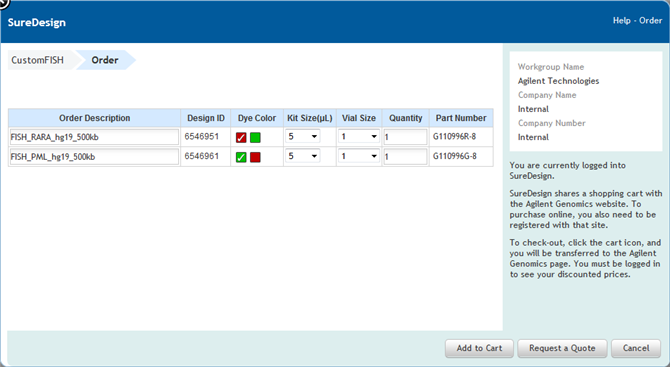
To request a price quote on the selected design, complete the fields on the Order dialog box and click Request a Quote. You then receive an e-mail from Agilent SureDesign confirming that your request was submitted. An Agilent sales representative will contact you to provide the quote, and, if desired, work with you to place an order.
You can order designs through SureDesign using your Agilent account. This account is separate from your SureDesign account. To register with Agilent, go to www.agilent.com/account.
To place an order for a design, complete the fields on the Order dialog box and click Add to Cart. The design is added to your Agilent shopping cart.
To open your Agilent shopping cart, close the Order dialog box and click Cart (shown below) near the top of the SureDesign program window.

The number in parentheses indicates the number of items in the cart.
NOTE Items will remain in your Agilent shopping cart for up to 30 days. To view your shopping cart at any time by, log in to SureDesign and click the Cart link near the top right corner of the program window, or log in to the Agilent website at www.agilent.com/account.
Before clicking Add to Cart or Request a Quote, complete the fields on the Order dialog box to specify how you will be using the selected design. The fields are described below.
Order Description
A description of the design or child design. You can edit the information in this field as desired. Alphanumeric characters, hyphens, underscores, and spaces are permitted. The Order Description must be no more than 40 characters.
Design ID
This design ID is the unique identifier number assigned by Agilent. This field is read-only.
Dye Color
Mark the red check box to have the FISH probe labeled with Cyanine-5. Mark the green check box to have the FISH probe labeled with Cyanine-3.
Kit Size (mL)
Select the quantity of FISH probe. The options are 5 mL and 20 mL.
Vial Size
Select the number of vials. Currently, you can only select one vial.
Quantity
In this field, indicate how many kits you want to order (or quote) for the selected design. Your entry must be a whole number.
Part Number
The Agilent part number for the product.
See Also
View, download, or order a favorite design
Contact Agilent Technical Support